Case Study
Case & Project Directory Generator
A workflow automation tool that standardized case and project setup across two environments: a Bash-based version for technical support training at Proofpoint, and a GUI-based AutoHotkey version for less technical content users at Amazon.
Overview
This project began as a Bash script at Proofpoint to help support learners create consistent case folders, notes files, and artifact locations without relying on manual setup. Later, I adapted the same core idea into an AutoHotkey GUI tool at Amazon so less technical users could create organized project structures in Windows without touching the command line.
Across both versions, the purpose stayed the same: make setup effortless, reduce inconsistency, and ensure project or case artifacts were easy to find later.
Challenge
Before this tool existed, users often dumped files into a single folder, left artifacts scattered across Documents and Downloads, or created ad hoc structures manually. Even when people made their own folders, the process was slow, inconsistent, and difficult to maintain over time.
That created predictable problems: slower setup, harder artifact retrieval later, and more friction when switching contexts between projects or cases.
The second challenge was audience. At Proofpoint, a shell-based workflow was appropriate for a more technical environment. At Amazon, that same approach would have created adoption barriers for users whose comfort level was closer to “File → Save” than command-line scripting. The solution needed to preserve the benefits of standardization while meeting users where they were.
Approach
I approached both versions as workflow standardization tools rather than generic folder generators. The goal was not just to create directories, but to establish a repeatable working structure that made documentation, screenshots, drafts, and other supporting artifacts easier to manage from the moment a case or project began.
At Proofpoint, that meant:
- validating case numbers
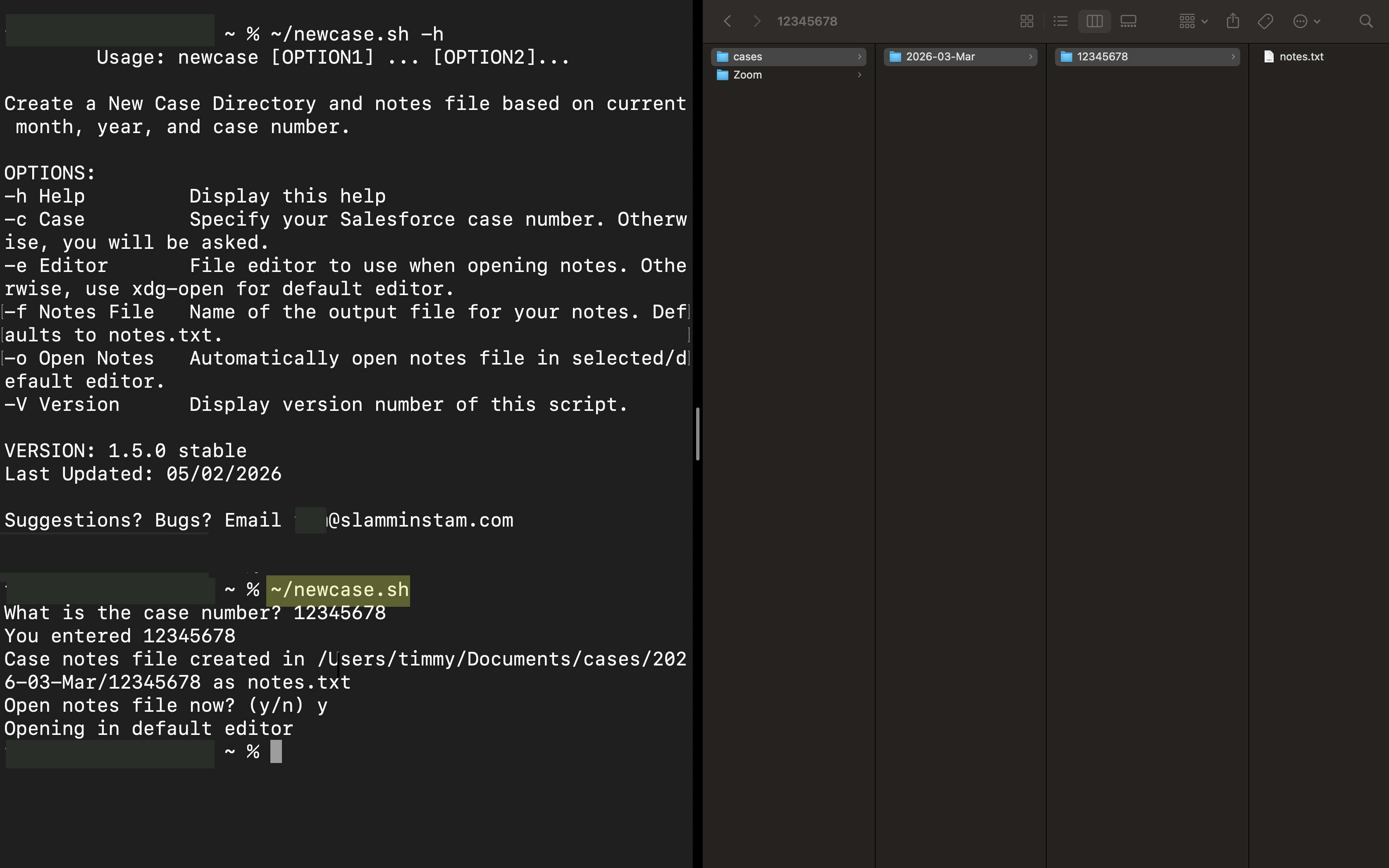
- creating predictable month-based case folders
- dropping in a notes file automatically
- optionally opening the notes file immediately so work could begin without extra clicks
At Amazon, that meant expanding the concept into a GUI workflow with additional safeguards and usability features:
- base-directory setup
- INI-backed configuration
- debug and logging support
- backups
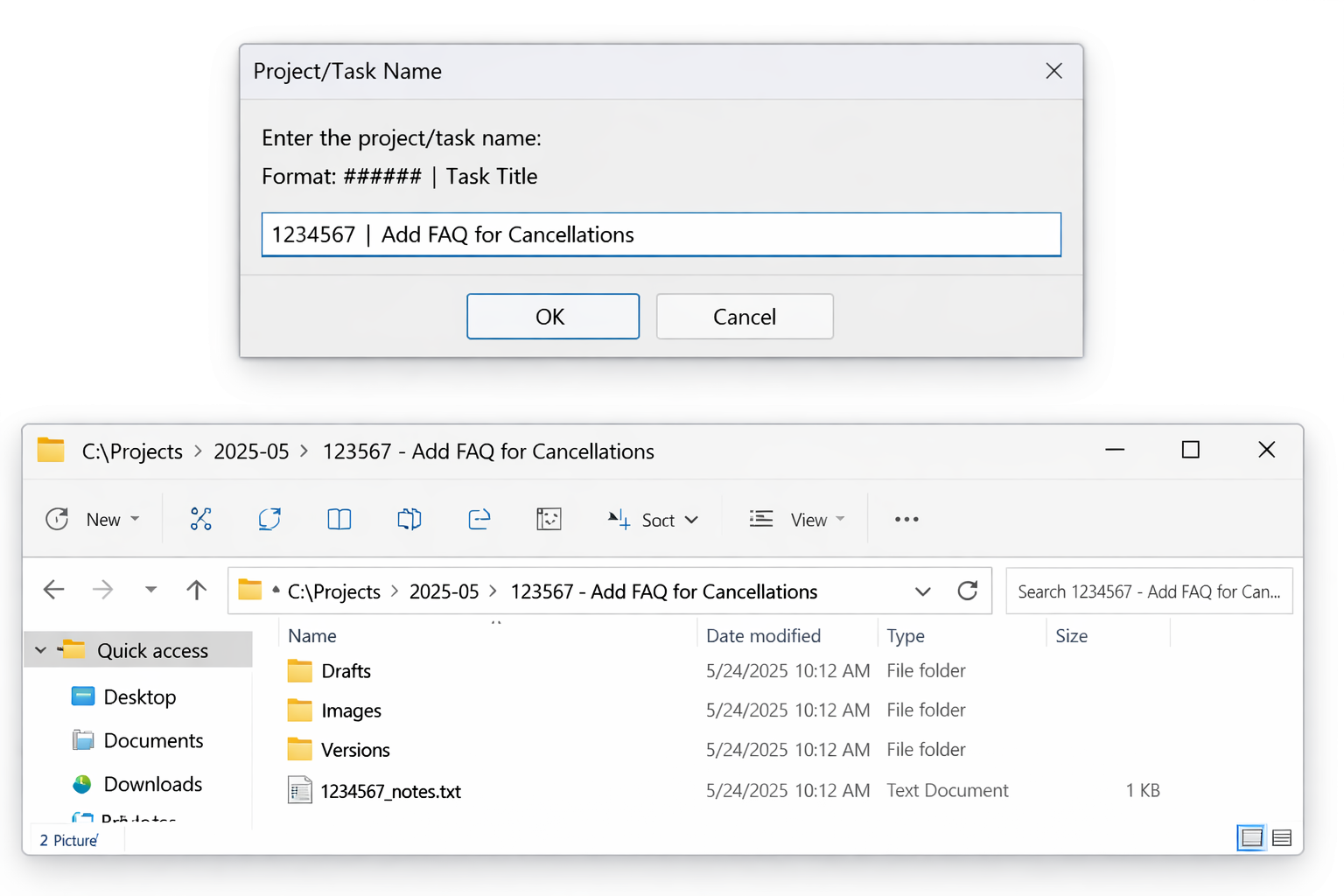
- Workfront-aligned naming
- automatic project subfolder creation
- a structured notes template for task metadata and supporting links
Solution
The result was a parent-child evolution of the same workflow concept across two environments and two scripting languages.
The original Bash version, newcase.sh, created a standardized case folder under a month-based directory structure and generated a notes file to keep learner documentation and support artifacts together. It was introduced to every new-hire support class after it was created, and new hires consistently relied on it.
The later AutoHotkey version, new-task.ahk, adapted the same standardization principle for Windows users who were already using hotkeys as part of daily work. It created project/task folders aligned to Workfront naming, added structured subfolders such as Drafts, Versions, and Images, and generated a more detailed notes template. After proof-of-concept use, it was integrated into the broader Team Hotkeys / CORE Hotkeys ecosystem and became part of the team’s normal workflow.
My Role
I designed and developed both versions of the tool, adapting the workflow to the context and technical comfort level of each audience.
- identified the workflow friction caused by manual, inconsistent folder creation
- designed a repeatable directory and notes structure for support and content workflows
- implemented the original Bash version for technical support learners at Proofpoint
- reworked the concept into a GUI-based AutoHotkey experience for Windows users at Amazon
- added configuration, backups, logs, and safety checks to support broader team use
- aligned the Amazon version to Workfront-based naming and later integrated it into CORE Hotkeys
Outcome
The biggest win across both environments was standardization that actually stuck because it was easy to use. The tool reduced project setup time, made artifacts easier to retrieve later, and made context-switching much easier because users could trust where things would be and how they would be named.
At Proofpoint, the script became part of new-hire training workflow across at least fifteen ten-week training waves. At Amazon, the AutoHotkey version was being used across the team as part of the CORE Hotkeys workflow before I left.
This project shows how workflow automation can do more than save clicks: it can create standards that improve organization, adoption, and downstream efficiency.
Selected Screens