Tim Stam

Tech Expertise, Creative Training Design, and Secure Development Solutions


Delivering engaging learning experiences, automating systems, and securing solutions to empower the next generation of digital technology.

Explore my Work

About Me

Hi, I'm Tim Stam—a Learning & Development professional passionate about bridging technology and education. With a background in instructional design, security practices, and automation, I create impactful training experiences and streamline technical processes to make learning both effective and accessible.

Key Skills:

  • Training Design & Development (ADDIE, Articulate, Coursera)
  • Automation & System Integration (AWS Lambda, Python Scripting)
  • Secure Development Practices
  • Technical Support and Problem Solving

What Drives Me:

At my core, I value creativity, efficiency, and building solutions that genuinely make people's lives easier. Whether it’s creating a new learning experience for technicians or developing a secure application, I strive to provide solutions that are not only effective but also accessible. My passion for technology is matched by my dedication to my family, which is my inspiration behind every problem I solve and every project I take on.

Tim Stam's Photo
 

Training Development Projects

New Machine Operations Training

Objective: Prepare Associates in three roles—Inductors, WaterSpiders, and Leadership—to operate a new packing machine safely and efficiently through targeted eLearning modules.

Challenges: Designing for different roles while addressing overlapping content.

  • Developed role-specific eLearning modules in Articulate Storyline.
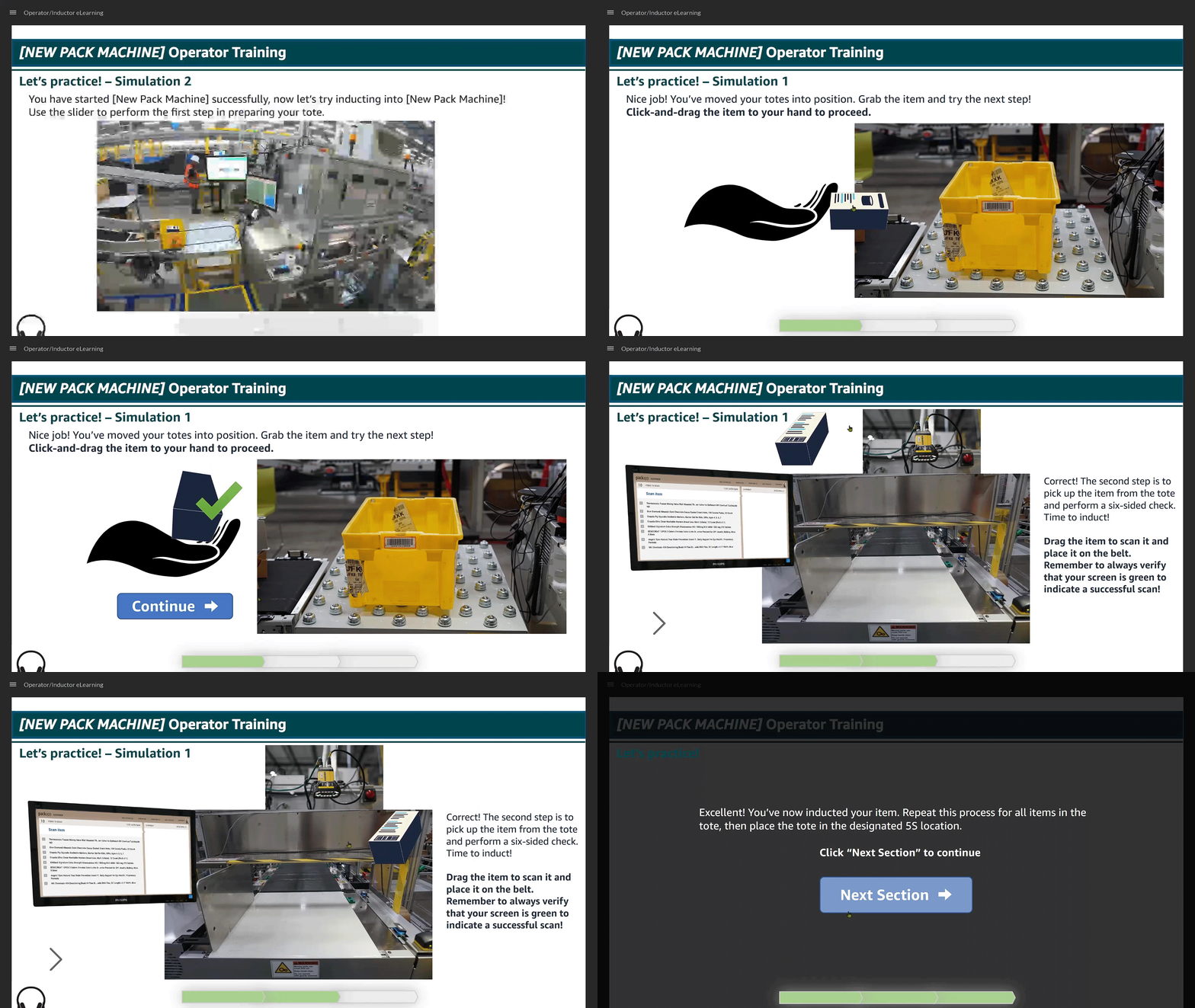
  • Included interactive elements, such as click-and-drag simulations where Inductors practiced the complete induction process.
  • Used a hybrid model to train Trainers with eLearning and in-person support for scalability.
Outcomes:
  • 98% Associate Trainee Satisfaction: Trainees praised the interactivity and depth of the content.
  • Learner Feedback:
    • "Interactive prompts kept me engaged."
    • "The simulations helped confirm my understanding of the tasks."
Tools Used:
  • Articulate Storyline with JavaScript for interactivity.
  • Qualtrics for learner evaluations and feedback collection.


Condensed Course Example

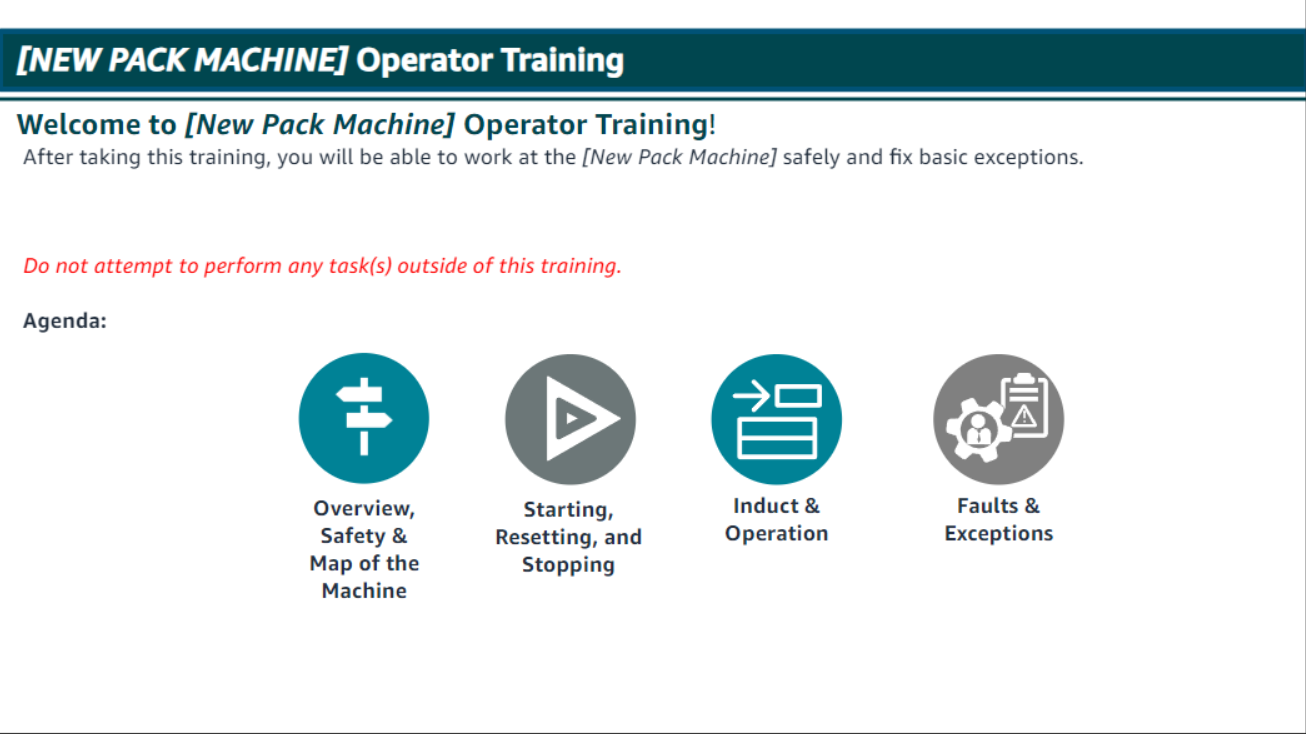
Main menu with agenda, and example of interactive elements. Main Menu Screenshot Operation Sim

Automation & System Development Projects

Case Creation Script - Workflow Diagram


Workflow Automation Diagram


Case Creation Script - Efficiency Gains

The Case Creation Script automates several key tasks involved in setting up directories and preparing case files for note-taking during support calls. By automating the initial setup, including directory creation, file naming, and preferred editor settings, the script has achieved significant efficiency gains for support operations:

  • Reduced manual task time by 30%, allowing support team members to focus on higher-priority tasks, such as problem-solving and customer communication, rather than tedious setup.
  • Decreased the chance of human error by ensuring a consistent and accurate directory and file setup, which is especially critical when dealing with time-sensitive customer issues.
  • Improved overall workflow efficiency by automating repetitive tasks that consumed valuable hours. This allowed support agents to quickly start note-taking without worrying about setup inconsistencies.
  • Enhanced speed and reliability in creating case files, meaning support agents can spend more time resolving issues during live calls, rather than getting bogged down in administrative tasks.
  • Boosted team morale and productivity by reducing repetitive work and making the process for taking notes on support calls smooth and dependable, leading to greater job satisfaction.

Security Practices & Solutions

Access Control Implementation

  • Designed and implemented secure access control systems using AWS ACLs and DynamoDB for fine-grained permissions, ensuring that only authorized individuals can access sensitive data.
  • Leveraged role-based access control (RBAC) to define user permissions based on job function, reducing unauthorized access risks and increasing overall system security.
  • Incorporated detailed audit logs to track access attempts, providing transparency and enabling rapid response to potential security incidents.
  • Ensured compliance with industry standards, enhancing the reliability and robustness of the access control mechanisms.

Custom Admin Sign-In Workflow

Used Amazon Cognito User Pools to create a secure and customized admin sign-in experience. This sign-in allowed administrators to authenticate and gain specific permissions to access and manage data in a DynamoDB table.

  • User Authentication: Admins authenticate via Amazon Cognito User Pools, ensuring secure login with features like MFA.
  • Role-Based Access: After successful login, Cognito assigns JWT tokens, which validate the admin's role and permissions for accessing DynamoDB.
  • Data Access: Authenticated admins can perform CRUD operations in the DynamoDB table using AWS SDK securely.

Admin Sign-In & Data Access Diagram

Admin Sign-In Workflow Diagram

Click to view the larger workflow of how Cognito User Pools integrate with DynamoDB for secure admin access.

Coding Projects

Code Sample: Pack Measurement Tool


# Python code example
# Measurement Calculation Logic

def get_item_orientation(length, width, height):
    # Determine whether the item should be placed in stand-tall orientation
    if length + height > 14:
        return "Sideline: Item exceeds dimensions for standard induction. Do not induct."
    if 12 <= length + height <= 14:
        return "Stand-Tall: Position with longest side standing vertically."
    return "Standard: Lay flat with longest side as primary axis."
            
View on GitHub

Interactive Demo

Watch a brief demo showing how the Packaging Measurement Tool calculates and suggests the optimal orientation for a variety of items.

Key Learning Outcomes

Key outcomes from developing this tool included honing my skills in algorithm refinement, enhancing my error-handling approach for improved user interaction, and exploring dynamic data visualization techniques for greater clarity.

Personal Project: Pack Measurement Tool

The Packaging Measurement Tool is designed to automate the determination of optimal packaging orientation, significantly enhancing operational efficiency. By automating the orientation decision process, this tool reduces human error by up to 25%, ensuring faster and more consistent packaging. This leads to more efficient workflows, ultimately increasing throughput in packaging operations.

Use Cases:

The Packaging Measurement Tool is particularly useful for warehouses and fulfillment centers where various item sizes require different orientations to optimize space, improve stability, and reduce damage risks during transport. The tool helps operators determine the optimal orientation for items based on their dimensions, resulting in improved consistency and reduced errors.

Challenges and Solutions:
  • Algorithm Refinement: Initially, the algorithm struggled with items where the length and width were nearly identical, causing unpredictable recommendations. I refined the logic to include tolerance ranges for more consistent and accurate decisions.
  • Error Handling: Early feedback indicated that users found error messages too vague. We iteratively improved the prompts to provide more context-sensitive guidance, reducing confusion and resulting in a better user experience.
  • 3D Visualization: Addressed visualization accuracy by dynamically adjusting plot parameters to align with calculated orientation. The visual output, such as charts and orientation diagrams, offers users a clear understanding of how to correctly position items.
Documentation:

This Python script helps determine optimal item orientation for packaging. Users input item dimensions, and the tool returns whether to use "Standard" or "Stand-Tall" orientation. Type 'help' at any prompt for usage instructions. The tool comes with built-in, step-by-step usage documentation, which makes it approachable for both new and experienced users.

View Full Documentation

Contact & Resume